
Pharmacy Compliance Management: Digital Systems vs Spreadsheets
Compare spreadsheet-based compliance tracking with dedicated pharmacy management systems. Discover why pharmacies are moving beyond Excel for certificate and document management.
Almost every pharmacy started their compliance tracking journey with a spreadsheet. It makes sense – Excel or Google Sheets is free, familiar, and flexible enough to track anything from staff certificates to equipment calibration dates.
At first, it works. With a small team and a limited number of documents to track, a single spreadsheet can hold everything you need. Colour coding helps highlight upcoming deadlines. Simple formulas calculate days until expiry.
But pharmacies do not stay simple. Staff join and leave. Services expand. Documentation requirements multiply. And that single spreadsheet becomes multiple spreadsheets, then folders of spreadsheets, then a confused mess where nobody quite knows which version is current.
Why Spreadsheets Seem Attractive
Familiarity: Most people know how to use spreadsheets. No training required, no learning curve.
Flexibility: You can structure data however you want, add columns at will, and create custom views.
Cost: No additional software cost beyond existing Office or Google licenses.
Where Spreadsheets Fail
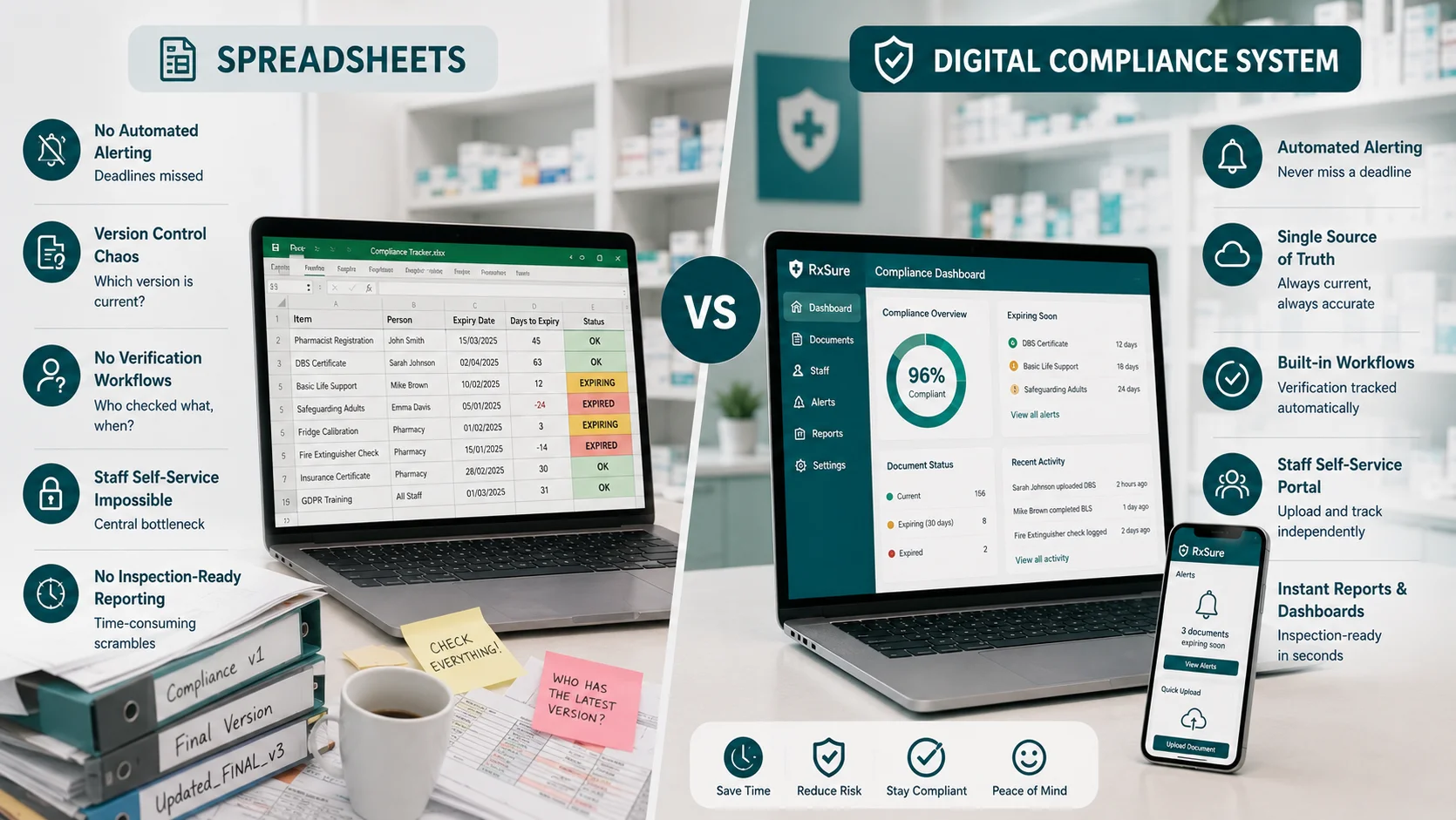
Limitation 1: No Automated Alerting
Spreadsheets store data – they do not act on it. When a DBS certificate approaches expiry, the spreadsheet does not send an alert. Someone must remember to check the spreadsheet regularly, identify items approaching deadlines, and take action.
In practice, this checking becomes sporadic. During busy periods, it stops entirely. Certificates expire without anyone noticing until an inspection or incident reveals the gap.
Limitation 2: Version Control Chaos
Spreadsheets have no built-in version control. When multiple people update the same file, you end up with multiple versions. Compliance_Tracker_v2_final_FINAL_updated.xlsx anyone?
Limitation 3: No Verification Workflows
Spreadsheets can record that a certificate was received, but they cannot manage the verification process. Who checked the document? When? What did they verify?
Limitation 4: Staff Self-Service Impossible
Spreadsheets require a coordinator to receive documents and update records. Staff cannot upload their own certificates because spreadsheet access is centrally controlled.
Limitation 5: No Inspection-Ready Reporting
When an inspector asks for evidence of compliance, spreadsheet users scramble. Locating the relevant spreadsheet, filtering data, and presenting information takes time.
What Modern Compliance Systems Offer
Automated Monitoring: Digital platforms actively monitor data. When a certificate approaches expiry, the system sends escalating alerts.
Single Source of Truth: Cloud-based systems maintain one version of data accessible from anywhere. No more version confusion.
Workflow Management: Define your verification processes within the system. Every step is recorded automatically.
Instant Reporting: Generate inspection evidence at the click of a button. Dashboards provide real-time compliance visibility.
Transform Your Compliance Management
RxSure provides purpose-built pharmacy compliance management designed specifically for UK pharmacy practice.
Start your free trial and move beyond spreadsheets today.