
TL;DR: You can go from signing up to seeing your first patient on RxSure in under an hour. This walkthrough covers the exact steps: account creation, service configuration, payment setup, and publishing your booking page. No technical skills required.
Most prescribers assume that setting up a digital prescribing platform takes days or weeks. In reality, RxSure is designed so that a qualified prescriber can go from zero to accepting patient bookings within a single sitting.
This guide walks through the exact steps, with realistic time estimates for each. The total setup time for most prescribers is 30–60 minutes.
Before You Start: What You Need
Have these ready before you begin:
- Professional registration number — GPhC, GMC, NMC, or GDC number
- Professional indemnity certificate — PDF or reference number from your insurer
- Stripe or PayPal account — for receiving patient payments (you can set this up during onboarding if you don’t have one)
- Practice details — business name, address, contact information
If you don’t have professional indemnity insurance that covers private prescribing, you’ll need to arrange this first. Providers such as Howden, Hiscox, and the PDA offer pharmacist IP cover.
Step 1: Create Your Account (5 Minutes)
Visit the RxSure free trial page and complete the registration form. You’ll need:
- Your name and email address
- Practice name and type (pharmacy, clinic, or solo practitioner)
- Professional registration number
No credit card is required for the 1 month free trial. Your account is active immediately after email verification.
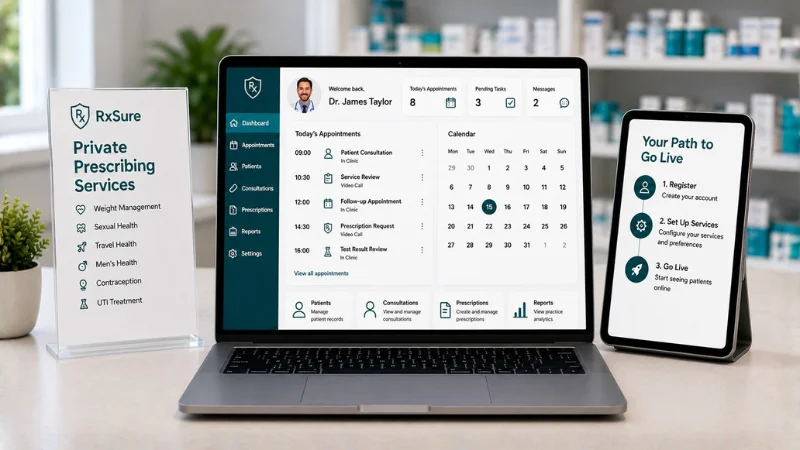
Step 2: Configure Your Services (15 Minutes)
RxSure includes pre-built service templates for the most common private prescribing services. Each template comes with:
- Clinical consultation questionnaire
- Patient consent form
- Documentation templates aligned to NICE guidance
Choose from templates including:
| Service | Typical Consultation Fee | Setup Time |
|---|---|---|
| Weight Management (GLP-1) | £50–150 | 5 min |
| Sexual Health | £30–80 | 5 min |
| Travel Health | £40–80 per vaccine | 5 min |
| UTI Treatment | £25–45 | 3 min |
| Dermatology | £40–100 | 5 min |
| Custom Service | You set the price | 10–15 min |
Select the templates you want, customise the pricing to match your market, and enable them. You can always add more services later.
Step 3: Set Your Availability (5 Minutes)
Configure when patients can book with you:
- Set your working hours — define which days and times you’re available for consultations
- Set consultation duration — typically 15–30 minutes per appointment
- Set buffer time — optional gaps between appointments for notes and preparation
- Block out dates — mark holidays and unavailable periods
The booking system automatically prevents double-bookings and respects your availability settings.
Step 4: Connect Payments (10 Minutes)
RxSure integrates with Stripe and PayPal for patient payments. The platform takes zero commission on your consultations — only standard payment processor fees apply (typically 1.4% + 20p for UK cards via Stripe).
To connect your payment account:
- Navigate to Settings → Payments
- Click “Connect Stripe” or “Connect PayPal”
- Follow the provider’s verification steps
- Set your consultation prices for each service
If you don’t have a Stripe account, you can create one during this step. Stripe typically approves UK healthcare professionals within minutes.
Step 5: Publish Your Booking Page (5 Minutes)
Your branded booking page is automatically generated based on your practice details and services. Review it, then click Publish. You can share this link on your website, social media, or in-pharmacy signage.
What your booking page includes:
- Your practice name and branding
- List of available services with descriptions and prices
- Real-time availability calendar
- Secure patient registration and payment
- Pre-consultation questionnaires
Step 6: You’re Live (0 Minutes)
That’s it. Your practice is now accepting online bookings. When a patient books:
- They complete the pre-screening questionnaire and pay online
- You receive a notification with the patient’s details and questionnaire responses
- At the appointment time, you conduct the consultation (face-to-face, video, or review the questionnaire)
- If clinically appropriate, you issue an e-prescription with full audit trail
- The consultation record is saved automatically for compliance
What About Compliance?
RxSure handles compliance documentation automatically as you work:
- Audit trail — every consultation, prescription, and clinical decision is logged with timestamps
- GPhC/CQC dashboard — compliance status visible at a glance
- Incident reporting — built-in incident log for near misses and adverse events
- Credential tracking — monitors your registration, indemnity, and training expiry dates
You don’t need to set up compliance separately — it’s built into the consultation workflow.
Common Questions
Do I need to be technically skilled?
No. If you can use a smartphone, you can set up RxSure. The interface is designed for clinicians, not IT professionals.
Can I add more services after launch?
Yes. You can add, modify, or remove services at any time. Many prescribers start with one or two services and expand as they gain confidence.
What if I need help during setup?
The onboarding team is available to guide you through setup. You can also book a demo first if you’d prefer a guided walkthrough before starting your trial.
What happens after the 1 month free trial?
The Pharmacy plan continues at £199/mo (excl. VAT) on a 12-month commitment. If you decide RxSure isn’t right for you, cancel during the trial with no charge.
Ready to Get Started?
Start your free trial and be live in under an hour.
No credit card required · Cancel anytime during trial
References
- The Human Medicines Regulations 2012 (SI 2012/1916), Regulation 217 — legislation.gov.uk
- GPhC Standards for Pharmacy Owners — pharmacyregulation.org
- GPhC Guidance on Prescribing — pharmacyregulation.org
About this article: This article was prepared by the RxSure editorial team and is informed by publicly available UK healthcare guidance. Source references include GPhC, NICE, and BNF where cited. Content is reviewed periodically to reflect current information. This article is for general informational purposes and should not be relied upon as professional, medical, or regulatory advice. Last updated: 9 July 2026.