
How to Choose E-Prescribing Software for Community Pharmacies
Practical guide for community pharmacy owners evaluating e-prescribing platforms. Covers multi-branch management, staff workflows, high-volume prescribing, GPhC compliance, and pricing models that scale.
Choosing e-prescribing software when you run a community pharmacy is nothing like choosing it as a solo prescriber. You have got staff rotas to manage, multiple pharmacists working different shifts, possibly two or three branches, and a superintendent pharmacist who needs to see everything that happens across all of them. The requirements are fundamentally different.
Most guides on this topic treat the decision as if every buyer is one person writing prescriptions from a single consulting room. That advice has its place, our 2026 Private Practice Guide covers that audience in detail. But if you own or manage a community pharmacy offering private clinical services, this guide is written specifically for you.
We will walk through the seven features that matter most for pharmacy teams, the pricing models that actually work at scale, and the questions you should be asking vendors before signing anything.
Why Community Pharmacies Need a Different Approach to E-Prescribing
A solo independent prescriber needs software that generates compliant private prescriptions, checks for drug interactions, and keeps an audit trail. Straightforward enough. A community pharmacy needs all of that, plus the operational infrastructure to run it across a team.
Think about what a typical day looks like. You might have two pharmacist independent prescribers running back-to-back consultations for travel vaccines and UTI treatment, a locum covering the afternoon, a dispenser processing the prescriptions, and a counter assistant managing the walk-in queue. Meanwhile, your superintendent pharmacist, who might not even be on site, needs confidence that every consultation, every prescription, and every clinical decision is properly documented across every branch.
That is not a prescribing problem. It is an operational management problem that happens to include prescribing. And the software you choose needs to reflect that reality.
7 Features Community Pharmacies Should Prioritise
1. Multi-Branch Management
If you operate more than one branch, or have plans to expand, this is the single most important capability to evaluate. Running separate systems per branch creates compliance gaps, duplicates admin work, and makes it nearly impossible to produce consolidated reports when you need them.
What you want is a centralised dashboard that shows activity across all locations from one login. Each branch should have its own configuration, different services, different opening hours, different booking availability, but the superintendent pharmacist should be able to see group-level compliance data without logging into three different accounts.
Be cautious of platforms that advertise multi-site support but really just offer separate accounts under the same billing arrangement. Ask for a live demonstration of the multi-branch dashboard before you commit. If they cannot show you a working example, it probably does not exist yet.
2. Staff Role Management and Access Controls
Your pharmacy team is not one person, and the software should not treat them as if they are. A pharmacist independent prescriber, a locum on a weekend shift, a dispenser, and a counter staff member all need different levels of access to the system.
Proper role-based permissions mean your dispenser can process prescriptions without accessing clinical consultation notes. Your locum can conduct consultations and prescribe without being able to modify branch settings or view financial reports. And your superintendent has read access across every branch, every staff member, and every clinical action, because that oversight is not optional. It is a GPhC requirement.
Locum onboarding deserves particular attention. Pharmacies rely on locums regularly, especially across multiple branches. The system should let you bring a locum on board for a single shift without compromising your audit trail or creating a permanent user account that lingers after they have left. Every action the locum takes should be logged under their own credentials, linked to their GPhC registration number, and visible to the superintendent.
3. High-Volume Prescription Workflows
Speed matters when you are running consultations back to back. A platform designed for five prescriptions a week will frustrate a team generating fifty a day.
Look at how the software handles volume in practice. Does it offer template libraries for common private services? If your pharmacy runs flu vaccination, travel vaccines, UTI treatment, and ear wax removal clinics, you should not be building the clinical pathway from scratch every time. Pre-built templates with the relevant SmPC-guided checks save significant time when the same service is being delivered dozens of times per week.
Repeat prescription management matters too. Patients on ongoing private treatment, vitamin B12 injections, weight management programmes, hair loss medication, need simpler repeat workflows with built-in review intervals. The system should flag when a patient is due for review rather than letting repeats continue indefinitely.
Medicine search should be fast. Auto-suggestions from a current BNF-aligned formulary, not a static dropdown list from two years ago. And if your pharmacy handles both walk-in and booked patients, the system should help manage that flow rather than treating every consultation identically.
Here is a reasonable benchmark: a routine repeat prescription for an established patient should take under sixty seconds from opening the record to generating the prescription. If it takes longer than that, the software is slowing your team down.
4. Integrated Patient Booking and Pre-Screening
Online booking has moved from nice-to-have to expected. Patients want to book a consultation the same way they book a restaurant or a haircut, online, at whatever hour suits them, without phoning during opening hours.
For community pharmacies, the booking system needs to be branch-aware. Patients should select the branch, choose the service, and see available slots for prescribers at that specific location. A booking system that cannot distinguish between your Stockport Road branch and your Didsbury branch is not fit for purpose.
Pre-screening forms are where the real efficiency gains come from. If the patient completes a medical history questionnaire before they arrive, the prescriber opens the consultation with the relevant information already on screen. That can cut face-to-face consultation time by a third, which matters enormously when you are running fifteen-minute appointment slots throughout the day.
Automated reminders reduce no-shows. A simple SMS or email the day before the appointment is usually enough. Some platforms report no-show reductions of 30 to 40 per cent after implementing automated reminders, that is revenue you would otherwise lose.
5. Compliance and Audit Trails for GPhC Inspections
Every community pharmacy offering private clinical services will face a GPhC inspection at some point. That is not a possibility, it is a certainty. When the inspector arrives, they will want to see a complete, tamper-proof record of every consultation, every prescription, and every clinical decision your team has made.
Your e-prescribing platform should provide automatic, timestamped logging of every action: consultation started, clinical notes recorded, prescription generated, payment taken. Each entry should identify which prescriber made the decision. If a prescriber proceeded despite a drug interaction or allergy alert, the system should have captured their clinical rationale for overriding the warning.
Crucially, you need to be able to generate inspection-ready audit reports on demand, in minutes, not hours. If producing a compliance report for the inspector means exporting spreadsheets, cross-referencing three different systems, and spending half a day compiling data, the platform is not doing its job. CQC-registered services have the same reporting expectations.
Ask the vendor directly: can you show me a sample audit report? If they hesitate, that tells you something.
6. Integrated Payments with No Per-Transaction Fees
Taking payment at the point of consultation eliminates the admin burden of chasing invoices after the fact. For multi-branch pharmacies, what matters just as much as collecting the payment is reconciling it across sites.
You want the system to show revenue per branch, per service, per prescriber, without your accountant having to export data from three different platforms and stitch it together in a spreadsheet. That reconciliation should happen automatically.
Watch out for per-prescription or per-transaction fees layered on top of a subscription. They seem small individually, but they compound quickly. A pharmacy generating 200 private prescriptions per month on a platform charging £1.50 per prescription is spending £300 monthly in transaction fees alone, on top of whatever the subscription costs. Over a year, that is £3,600 that goes straight to the software provider instead of into your business. Flat pricing with no per-prescription charges eliminates that drain entirely.
7. Reporting and Analytics for Pharmacy Owners
Private clinical services are a business as well as a clinical operation. Gut feeling is not good enough when you are deciding whether to hire a second prescriber, expand into a new service area, or close a clinic that is not covering its costs.
Useful reporting should give you:
- Revenue per branch, per pharmacist, and per service type, so you know where the money is actually coming from
- Consultation volume trends, daily, weekly, monthly patterns that inform staffing decisions
- Most and least popular services by location, what works in one area might not work in another
- No-show rates by service and branch, persistently high no-shows suggest a booking or communication problem worth fixing
- Patient demographics, understanding who your patients are helps you decide which services to offer next
This is the data that helps you decide whether Saturday afternoon travel clinics justify the locum cost, or whether that new vitamin B12 service is actually generating enough appointments to keep running.
Pricing Models: What Actually Works at Scale
Three pricing models dominate the pharmacy e-prescribing market. The right choice depends almost entirely on your prescription volume.
Pay-Per-Prescription
Typically £1 to £2 per prescription generated. At low volumes, say twenty prescriptions a month from a single prescriber, the maths works out. But the cost scales linearly with your business growth, which means the more successful your private services become, the more you pay. A pharmacy group generating 500 private prescriptions monthly across three branches would be paying £500 to £1,000 per month in generation fees alone, before any subscription or booking costs. That model penalises the very growth you are trying to achieve.
Flat Monthly Subscription
A fixed monthly fee regardless of prescription volume. Far more predictable and significantly better value once you exceed roughly fifty prescriptions per month. The critical question is what the subscription includes, some vendors charge a flat fee for prescriptions but then bill separately for booking, payment processing, or compliance reporting. Make sure you understand the total cost, not just the headline figure.
Free or Feature-Limited
Usually ad-supported or stripped back to cover only basic prescription generation. These tools rarely include booking, payments, compliance features, or multi-branch support. The hidden cost is the time and money you spend connecting separate tools for everything the free platform does not cover, and the compliance risk of running clinical data through systems that were never designed for regulated healthcare.
The community pharmacy calculation is straightforward: add up your total monthly private prescriptions across all branches. If the number exceeds fifty, a flat subscription that includes the complete workflow, booking, consultations, prescriptions, payments, compliance, will almost certainly cost less than a per-prescription model supplemented by separate tools for everything else.
Six Questions Your Software Vendor Must Answer
Before committing to any platform for a multi-branch community pharmacy, get clear answers to these questions. Vague responses or “that feature is on our roadmap” should give you pause.
- Can I manage all branches from one login? Separate logins per branch usually means multi-site support was bolted on as an afterthought rather than built into the architecture.
- Can I configure different services, hours, and availability per branch? Your town-centre pharmacy running walk-in travel clinics has different operational needs from your suburban branch offering appointment-only weight management consultations.
- How are locum pharmacists handled? You need to onboard someone for a single shift without giving them permanent system access or creating gaps in your audit trail.
- What happens if one branch loses internet connectivity, does it affect the others? Branch independence matters. An outage at one location should never take down your entire operation.
- Can I run group-level compliance reports for the superintendent pharmacist? The superintendent is personally accountable for standards across every branch. The software must support that oversight without requiring manual data collection from each site.
- Is there a free trial that lets me test across two or more branches? If the vendor will not let you test multi-branch functionality before paying, treat that as a red flag.
Red Flags When Evaluating Pharmacy E-Prescribing Platforms
After working with pharmacies across the UK, certain patterns consistently signal a platform that will cause problems down the line:
- No multi-site support, or “coming soon” when you ask about it. If your business already operates multiple branches, you need a platform that delivers this today, not next quarter.
- Per-prescription fees with no volume cap, the cost grows with your business, and switching platforms later is painful enough that most pharmacy owners simply absorb the increasing charges.
- No staff role differentiation, if every user gets identical access, the platform was built for solo practitioners, not pharmacy teams.
- No mention of GPhC or CQC compliance, if the vendor does not talk about audit trails, inspection readiness, or regulatory compliance, the software was not designed for registered pharmacy environments.
- Stale development, ask when the last update was released. Monthly releases suggest active development. An update from six months ago suggests a product coasting on existing customers.
- No free trial, never commit to annual billing without testing the platform with your actual team, your actual services, and real patient workflows.
Data Security and GDPR Considerations
Patient health data is classified as special category data under UK GDPR, which means your e-prescribing platform must meet higher data protection standards than a standard business application.
Check where the vendor hosts their data. UK-based data centres are strongly preferred, if patient data is processed outside the UK, additional safeguards and legal mechanisms are required under the UK GDPR adequacy framework. Ask specifically about their hosting location, not just whether they are “GDPR compliant.” Everyone claims compliance; not everyone can prove it.
Encryption at rest and in transit should be standard. Multi-factor authentication for staff logins protects against credential compromise. And the platform should support your responsibilities under the Data Protection Act 2018, including the ability to respond to subject access requests and delete patient data when retention periods expire.
If the vendor holds Cyber Essentials or Cyber Essentials Plus certification, that is a good baseline indicator. If they can demonstrate DCB0129 clinical safety certification and NHS DSPT compliance, better still.
Already Using a Platform? What to Consider Before Switching
Switching e-prescribing providers is disruptive, but staying with the wrong platform costs more in the long run. If you are considering a move, think through these points:
- Data export: Can your current provider export patient records, consultation history, and prescription data in a structured format? If they make extraction difficult, that is telling.
- Contract terms: Check for lock-in periods and auto-renewal clauses. Some vendors require 90 days’ notice to cancel.
- Staff retraining: Budget time for your team to learn the new system. A platform with an intuitive interface and proper onboarding support will reduce this period significantly.
- Parallel running: Consider running both platforms side by side for two to four weeks so your team can transition gradually without disrupting patient care.
Ask the new vendor whether they assist with data migration. Some platforms offer guided onboarding programmes that include importing historical patient data and configuring your services, which saves your team from starting with a blank system.
How RxSure Supports Community Pharmacies
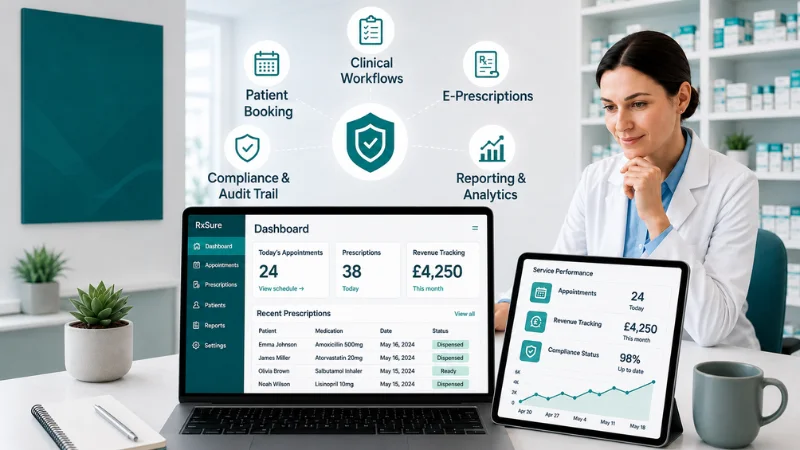
RxSure was built for the way UK pharmacies actually work, multiple branches, multiple prescribers, high-volume private services, and the compliance demands that come with GPhC and CQC registration.
- Multi-branch management from a single dashboard with per-branch configuration
- Staff roles and access controls for pharmacists, locums, dispensers, and superintendent oversight
- SmPC-guided consultation templates for common private services with built-in clinical safety checks
- Integrated booking with branch-specific availability and patient pre-screening forms
- Digital prescription generation with no per-prescription charges
- Payment processing with automatic reconciliation across all branches
- GPhC and CQC compliance tools with inspection-ready audit trails
- Reporting and analytics at both branch and group level
Flat pricing at £199 per month includes the entire workflow, booking, consultations, prescriptions, payments, compliance reporting, with no per-prescription fees. Your costs stay predictable as your private services grow.
Explore all features · For pharmacies · Start free trial
If you are an independent prescriber evaluating platforms for a solo or small private practice, see our Private Practice Guide 2026, it covers the regulatory and workflow considerations specific to that setting.
Frequently Asked Questions
What is the difference between e-prescribing software and a full clinic management platform?
E-prescribing software handles prescription generation, creating, checking, and transmitting private prescriptions digitally. A full clinic management platform goes further, covering patient booking, clinical consultations, pre-screening, payment processing, compliance reporting, and multi-branch oversight in one system. For community pharmacies running multiple private services, a standalone prescribing tool usually means bolting on three or four other systems to cover the gaps.
Do I need separate software for each pharmacy branch?
Not if you choose a platform with genuine multi-branch support. The right system lets you manage all branches from a single account, with per-branch configuration for services, hours, and staff availability. Separate systems per branch create data silos, duplicate admin, and make consolidated compliance reporting extremely difficult.
How do I handle locum pharmacists in the system?
The platform should let you create time-limited locum accounts linked to the pharmacist’s GPhC registration number. The locum works under their own credentials for the duration of their shift, every action is logged against their name, and their access expires automatically. The superintendent pharmacist can review their consultations and prescriptions through the same audit trail used for permanent staff.
What if the internet goes down during a consultation?
Ask the vendor about their offline resilience and uptime guarantees. Reliable platforms maintain 99.9 per cent uptime and preserve in-progress consultation data during brief connectivity interruptions. For community pharmacies, you also want branch independence, an outage at one location should not affect other branches.
Can I switch from my current e-prescribing provider without losing patient data?
Yes, provided your current provider allows data export in a structured format. Most reputable platforms support this. The new provider should offer onboarding assistance including data migration support. Budget two to four weeks of parallel running so your team can transition gradually without disrupting patient care.
Is flat-rate pricing really cheaper than pay-per-prescription?
Almost always, once you exceed roughly fifty prescriptions per month. At £1.50 per prescription and 200 monthly prescriptions, you are paying £300 in transaction fees alone, £3,600 per year, on top of any subscription cost. A flat rate at £199 per month covers unlimited prescriptions and includes booking, consultations, payments, and compliance tools. The crossover point is low enough that most community pharmacies pass it within their first month of offering private services.
Key Takeaways
- Community pharmacies need volume-ready workflows, multi-branch oversight, and staff role management, tools designed for solo prescribers will not scale with your business
- Multi-branch management and role-based access controls are non-negotiable if you operate more than one location
- Flat subscription pricing beats per-prescription models above roughly fifty prescriptions per month, and that threshold is lower than most pharmacy owners expect
- Your platform should produce an inspection-ready GPhC audit trail on demand, not after a day of manual data compilation
- Always test with a free trial across real branches, with real staff, before committing to annual billing
Sources and References
- General Pharmaceutical Council, Standards for Pharmacy Professionals (2024)
- NICE, Medicines Optimisation Guidelines (NG5, updated 2024)
- British National Formulary, BNF Online (2024)
- Information Commissioner’s Office, UK GDPR Guidance (2024)
- Human Medicines Regulations 2012, SI 2012/1916, Part 12