

Private Prescription Software vs Paper Prescriptions: Complete Comparison
A detailed comparison of private prescription software vs paper prescriptions. Safety, efficiency, compliance, and cost compared side-by-side for UK pharmacies and clinics.
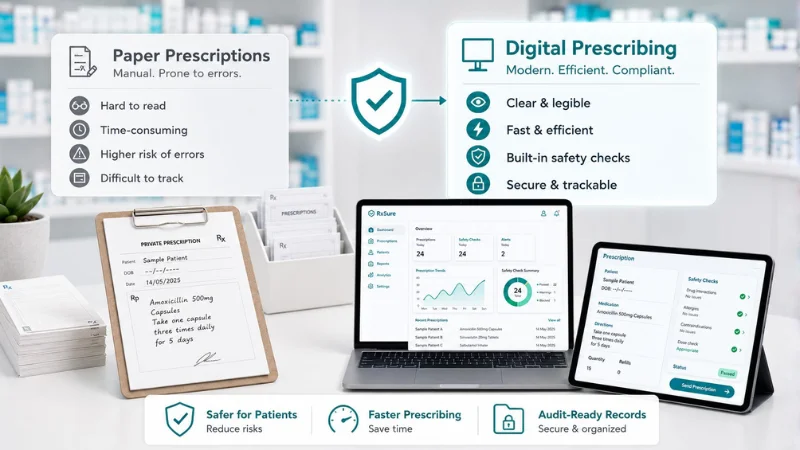
Many UK pharmacies and clinics still use paper for private prescriptions. Handwritten FP10P forms have been the standard for decades. But as private services grow, from weight management and travel health to sexual health clinics, the limitations of paper become costly: illegible handwriting, lost records, compliance gaps, and wasted time. This article compares private prescription software against paper prescriptions across safety, efficiency, compliance, and cost.
How Paper Private Prescriptions Work
Electronic prescribing software has become essential for UK healthcare professionals who issue private prescriptions, replacing handwritten paper forms with secure digital workflows that reduce prescription errors, speed up consultations, and create complete audit trails. In the private prescribing sector, where prescriptions fall outside the NHS Electronic Prescription Service, practitioners need dedicated e-prescribing platforms that handle the entire workflow from patient assessment through medication selection, dosage calculation, prescription generation, and dispensing verification. The key advantages of e-prescribing over paper-based systems include elimination of illegibility errors which account for approximately ten per cent of prescription-related incidents, automatic drug interaction and contraindication checking against the patient’s medication history, structured prescription formats that comply with GPhC and CQC requirements, digital signatures with tamper-proof verification, and searchable records that simplify clinical audits and regulatory inspections. Modern e-prescribing platforms such as RxSure integrate prescription generation into a broader workflow that also covers patient booking, clinical consultations, and payment processing.
The paper private prescription process typically follows this workflow:
- Patient arrives (often without pre-booked appointment)
- Prescriber conducts a consultation and takes handwritten notes
- Prescriber writes out the private prescription on an FP10P form
- Patient takes the paper prescription to a dispensing pharmacy
- Payment is handled separately (cash, card terminal)
- Records are filed in paper folders or scanned later
This process has worked for decades. But it introduces risks and inefficiencies that become unacceptable as private prescribing volume increases.
How Private Prescription Software Works
Choosing the right e-prescribing software requires evaluating several critical factors beyond basic prescription generation capability. The platform should include a comprehensive medication database covering the full British National Formulary with automatic dosage guidance, drug interaction checking, and allergy alerts based on the patient’s recorded history. Integration with the clinical consultation workflow is essential so that prescribing decisions are documented within the context of the patient assessment, creating a complete clinical record rather than an isolated prescription. Compliance features should include real-time audit trail logging of every prescribing action, controlled drug register functionality where applicable, and the ability to generate regulatory reports for GPhC inspections. The pricing model matters significantly for independent practitioners: per-prescription fee models can cost five to fifteen pounds per consultation, while flat-rate platforms such as RxSure charge a fixed monthly fee regardless of prescription volume. Finally, the platform should support both in-person and remote prescribing workflows with integrated video consultation capability.
With electronic private prescription software, the workflow becomes:
- Patient books online, pre-screening questionnaire captured automatically
- Prescriber conducts a consultation guided by SmPC-based clinical templates
- Software generates a legally valid electronic prescription in seconds
- Patient receives the prescription digitally (or printed on-site)
- Payment is processed within the same platform
- Complete audit trail is created automatically, every step timestamped
Head-to-Head Comparison
Clinical Safety
| Factor | Paper | Software |
|---|---|---|
| Legibility | Depends on handwriting, prescribing errors from misread scripts are well-documented | Always clear, typed text eliminates handwriting errors |
| Drug interaction checks | Manual, relies entirely on prescriber knowledge | Automated flags for interactions, contraindications, allergies |
| Dosage guidance | Prescriber must recall or look up independently | SmPC-guided templates embed dosage information in workflow |
| Consultation structure | Varies by prescriber, no standardisation | Structured templates ensure consistent, evidence-based consultations |
Verdict: Software is significantly safer. Illegible prescriptions are a known patient safety risk, and automated checks catch errors that tired or busy prescribers miss.
Efficiency
| Factor | Paper | Software |
|---|---|---|
| Prescription creation time | 3-5 minutes (handwriting) | 30-60 seconds (auto-populated) |
| Patient booking | Phone calls, walk-ins, diary management | Online self-service booking with reminders |
| Payment processing | Separate card terminal or cash | Integrated, paid during consultation |
| Record filing | Manual filing or scanning | Automatic, searchable digital records |
| Repeat prescriptions | Rewrite from scratch | One click to regenerate |
Verdict: Software saves 3-5 minutes per prescription. At 10 prescriptions per day, that’s 30-50 minutes saved daily, or over 10 hours per month that can be spent seeing more patients.
Compliance & Audit
| Factor | Paper | Software |
|---|---|---|
| Audit trail | Paper files, can be lost, damaged, or incomplete | Automatic, timestamped, tamper-proof digital audit trail |
| GPhC inspection preparation | Requires pulling paper files, hoping nothing is missing | Instant access to complete records with filters and search |
| Data security | Physical storage, fire, theft, water damage risks | Encrypted cloud storage with backups |
| GDPR compliance | Difficult, manual access controls, no automatic retention | Built-in access controls, retention policies, data export |
| Record retrieval | Minutes to hours (searching folders) | Seconds (search by patient, date, medication) |
Verdict: Software makes compliance straightforward rather than stressful. GPhC inspectors increasingly expect digital record-keeping for private services.
Cost
| Factor | Paper | Software |
|---|---|---|
| Prescription pad costs | £30-60/year for FP10P pads | Included in software |
| Separate booking system | £20-50/month | Included |
| Separate payment terminal | £15-30/month + transaction fees | Included (zero platform fees) |
| Filing and storage | Staff time + physical storage | Included (digital) |
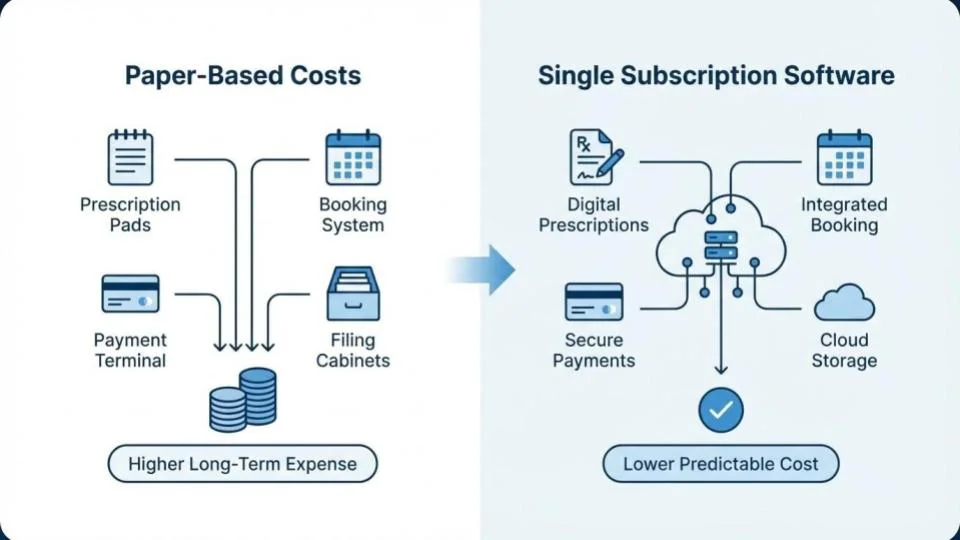
| Total monthly cost | £65-140/month (separate tools) | One subscription covers everything |
Verdict: Paper looks cheaper until you add up the separate tools you need for booking, payments, and record-keeping. An all-in-one platform typically costs the same or less while doing far more.
When Paper Still Makes Sense
To be fair, paper prescriptions still work for:
- Very low volume: If you issue fewer than 5 private prescriptions per month, the overhead of software may not be justified
- One-off prescriptions: A GP writing an occasional private script may not need a dedicated platform
- Backup: Paper should remain available as a contingency if software is temporarily unavailable
But for any pharmacy or clinic running private services as a meaningful part of their business, the case for software is overwhelming.
Making the Switch
Transitioning from paper to electronic private prescribing is straightforward:
- Choose your platform: Select software that covers your full workflow. RxSure’s features include booking, consultations, prescriptions, payments, and compliance in one platform.
- Set up your services: Configure the private services you offer with appropriate templates and pricing.
- Train your team: Most platforms can be learned in a single session. Focus on the consultation workflow and compliance features.
- Run parallel for 1-2 weeks: Use both paper and software simultaneously until your team is confident.
- Go fully digital: Switch over and keep paper pads as backup only.
References
- General Pharmaceutical Council. Standards for Pharmacy Professionals. GPhC, 2024.
- National Institute for Health and Care Excellence. NICE Guidelines. NICE, 2024.
- British National Formulary. BNF Online. NICE, 2024.
- Information Commissioner’s Office. Guide to UK GDPR. ICO, 2024.
Key Takeaways
- Paper prescriptions introduce safety risks (legibility), efficiency losses (time), and compliance gaps (audit trails)
- Private prescription software saves 10+ hours per month at typical volumes
- Compliance is dramatically easier with automatic digital audit trails
- The total cost of paper + separate tools often exceeds a single software subscription
- The switch from paper to software typically takes less than a week
- Any pharmacy running private services as a regular part of business should be using software