
Online patient booking is no longer a nice-to-have for UK pharmacies — it’s essential. Patients expect to book healthcare appointments online, just as they book GP appointments, dentist visits, and hairdressers. Pharmacies without online booking are losing appointments to those that have it. This guide covers how to set up online booking for your pharmacy’s private services, what features to look for, and how it connects to your wider prescribing workflow.
Why Online Booking Matters for Pharmacies
The shift to digital booking is driven by clear patient behaviour:
- 73% of patients prefer to book healthcare appointments online rather than by phone (NHS Digital, 2025)
- Reduced no-shows: Automated reminders via SMS and email cut no-show rates by 30-50%
- 24/7 availability: Patients can book outside pharmacy opening hours — evenings and weekends are peak booking times
- Reduced admin: No more phone tag, diary management, or manually recording appointment details
- Pre-screening: Online booking captures patient information before the appointment, making consultations more efficient
What Your Booking System Needs
Not all booking systems are equal. For a pharmacy offering private prescribing services, you need specific features:
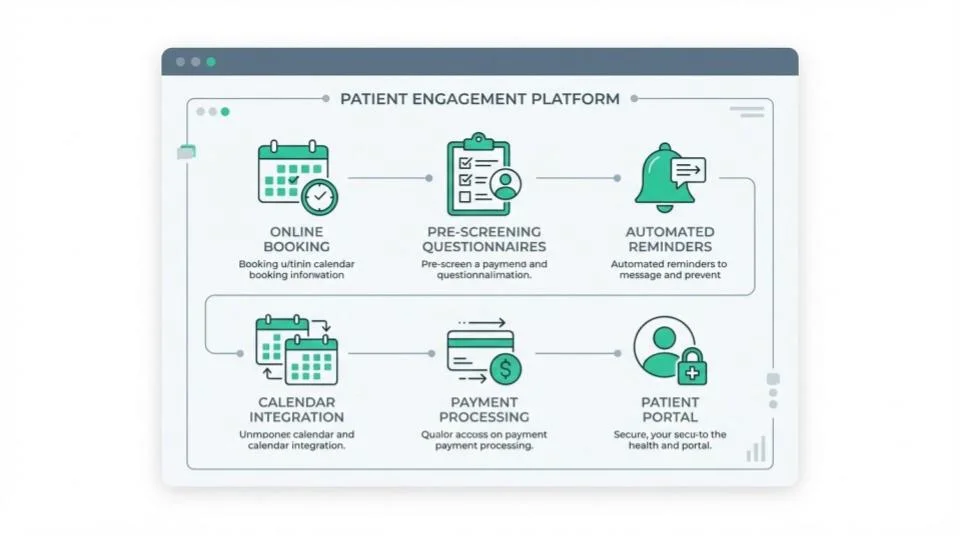
1. Service-Specific Booking
Patients should be able to select the service they need: weight management consultation, travel health appointment, sexual health consultation, etc. Each service should have appropriate appointment duration, pricing displayed, and the correct pre-screening questionnaire.
2. Pre-Screening Questionnaires
This is where pharmacy booking differs from generic booking tools. When a patient books a weight management consultation, they should complete a medical questionnaire capturing their medical history, current medications, allergies, and relevant health information — before they arrive. This means the prescriber has all the safety information needed when the consultation starts.
3. Automated Reminders
SMS and email reminders at 24 hours and 1 hour before the appointment significantly reduce no-shows. For a pharmacy seeing 10 private patients per day, reducing no-shows from 20% to 5% means 1-2 extra consultations per day — directly impacting revenue.
4. Calendar Integration
The booking system must manage pharmacist availability, prevent double-booking, and account for consultation room availability. Multi-prescriber pharmacies need per-practitioner calendars.
5. Payment Integration
Ideally, patients can pay the consultation fee at the time of booking (reducing no-shows further) or at the point of service. Integrated payment means no separate card terminal or cash handling for private services.
6. Patient Portal
Patients should be able to view their upcoming appointments, reschedule or cancel (with appropriate notice), and access their consultation history. This improves the patient experience and reduces admin calls.
Standalone Booking vs Integrated Platform
You have two main options for adding online booking to your pharmacy:
Option A: Standalone Booking Tool
Tools like Calendly, Acuity, or SimplyBook.me provide general-purpose online booking. They’re affordable and quick to set up.
Pros: Low cost, easy setup, works for basic appointment scheduling
Cons: No pharmacy-specific pre-screening questionnaires, no integration with prescribing workflow, no compliance features, separate payment processing needed, patient data stored in a separate system from clinical records
Option B: Integrated Pharmacy Platform
Platforms like RxSure include booking as part of the complete prescribing workflow — booking flows directly into pre-screening, consultation, prescription, and payment.
Pros: One system for everything, pre-screening questionnaires built in, automatic audit trail, integrated payments, compliance management, patient data in one place
Cons: Monthly subscription cost (though often less than standalone booking + separate tools)
Our recommendation: If you’re running private prescribing services, an integrated platform saves time, reduces errors, and ensures compliance. Using a generic booking tool alongside separate prescribing and payment tools creates fragmentation that makes compliance harder.
Setting Up Online Booking: Step by Step
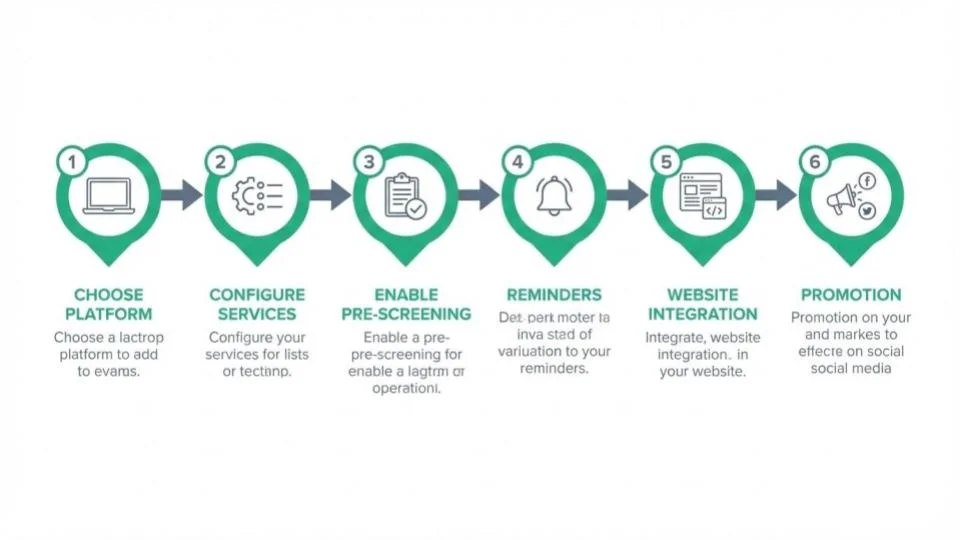
- Choose your platform: Select a booking system that meets your needs. For private prescribing, prioritise integration with your clinical workflow over standalone booking features.
- Configure your services: Set up each private service with: service name and description, appointment duration, pricing, practitioner assignment, and linked pre-screening questionnaire.
- Set practitioner availability: Define when each prescriber is available for private consultations. Block out time for NHS services, breaks, and admin.
- Enable pre-screening: Create or activate pre-screening questionnaires for each service. These should capture medical history, current medications, allergies, and service-specific information.
- Set up reminders: Configure automated SMS and email reminders at 24 hours and 1 hour before appointments.
- Add booking to your website: Embed the booking widget on your pharmacy website’s services page. Make the “Book Now” button prominent and easy to find.
- Promote: Share your online booking link on social media, Google Business Profile, in-pharmacy signage, and any existing patient communications.
Measuring Success
Track these metrics to evaluate your online booking system:
- Online vs phone bookings: Aim for 60%+ bookings coming through online within 3 months
- No-show rate: Should decrease to under 10% with automated reminders
- Pre-screening completion: Should be 90%+ (patients complete questionnaires before arriving)
- Average consultation time: Should decrease as pre-screening provides information upfront
- Patient satisfaction: Gather feedback on the booking experience
Common Mistakes to Avoid
- Using personal calendars: Google Calendar or Outlook are not GDPR-compliant for patient bookings and create no audit trail
- No pre-screening: Without pre-screening, the prescriber spends consultation time gathering basic information instead of clinical assessment
- Ignoring mobile: Over 70% of bookings happen on mobile — your booking system must be mobile-friendly
- Not promoting: Building a booking system nobody knows about is pointless. Actively promote on every channel
- Fragmented systems: Using separate tools for booking, consultations, prescriptions, and payments creates admin overhead and compliance gaps
Key Takeaways
- Online booking is essential for pharmacies offering private services in 2026
- Automated reminders reduce no-shows by 30-50%
- Pre-screening questionnaires make consultations faster, safer, and more compliant
- Integrated platforms (booking + prescribing + payments) outperform standalone booking tools
- Aim for 60%+ online bookings within 3 months of launch
- Always ensure your booking system is GDPR-compliant and creates audit trails