


Choosing the right e-prescribing software is one of the most important decisions a UK pharmacy or clinic can make when launching or scaling private services. The wrong choice means operational headaches, compliance gaps, and hidden costs. The right choice streamlines your entire private prescribing workflow. This guide walks you through exactly what to evaluate and why.
Why Your Choice of E-Prescribing Software Matters
E-prescribing software sits at the centre of your private services operation. It affects clinical safety, patient experience, staff efficiency, compliance readiness, and your bottom line. A platform that only generates prescriptions leaves you stitching together separate tools for booking, consultations, and payments. An all-in-one platform like RxSure eliminates that fragmentation.

The 8 Essential Features to Evaluate
1. Electronic Prescription Generation
This is the baseline. Every e-prescribing platform generates electronic prescriptions. But look deeper: does it auto-populate patient details? Does it include drug interaction warnings? Can prescriptions be sent digitally to dispensing pharmacies? The quality of prescription generation varies significantly between platforms.
2. Clinical Consultation Workflows
The best platforms don’t just generate prescriptions — they guide the clinical consultation that precedes prescribing. Look for SmPC-guided consultation templates that embed contraindication checks, dosage guidance, and safety warnings directly into the workflow. This is what separates a prescribing tool from a complete consultation platform.
3. Patient Booking System
Can patients book consultations online? Does the booking system capture pre-screening information before the appointment? Integrated booking eliminates no-shows (through automated reminders) and ensures prescribers have patient information before the consultation begins.
4. Payment Processing
Private prescribing involves payment. If your e-prescribing software doesn’t include payment processing, you need a separate system — adding complexity and cost. Look for integrated payments with no platform fees on patient transactions.
5. Compliance & Audit Trail
GPhC and CQC inspectors expect complete records of every private prescription and consultation. Your software must provide automatic, tamper-proof audit trails — not optional add-ons. Every action (booking, consultation notes, prescription, payment) should be timestamped and stored.
6. Multi-Site Support
If you operate or plan to operate multiple pharmacy branches or clinic locations, your software must support multi-site management with centralised compliance, cross-site reporting, and per-site configuration. Not all platforms offer this — many are designed for single-site use only.
7. Video Consultation Capability
Post-pandemic, patients expect the option of remote consultations. Does the platform support video consultations with the same clinical governance and documentation as face-to-face appointments?
8. Reporting & Analytics
Understanding your private services performance requires data: prescriptions per service, revenue per pharmacist, popular services, patient demographics. Good reporting helps you optimise services and demonstrate value.
Pricing Models: What to Watch For
E-prescribing software pricing falls into three main models:
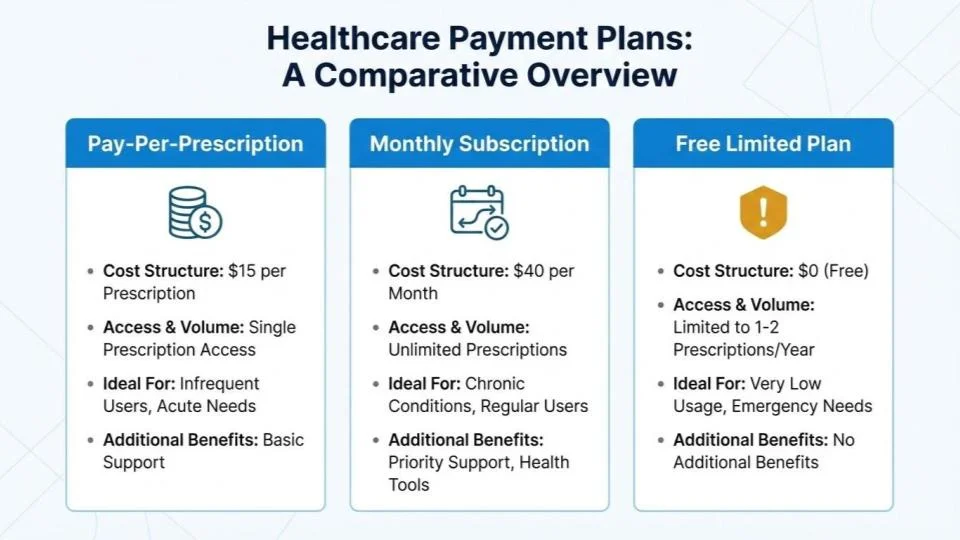
Pay-Per-Prescription
You pay a fee for each prescription generated (typically £1-2 per Rx). This seems cheap at low volumes but becomes expensive as you grow. At 200 prescriptions per month, you could be paying £200-400/month for prescription generation alone — with no booking, consultations, or payments included.
Monthly Subscription
You pay a flat monthly fee regardless of prescription volume. This is more predictable and typically better value above 50 prescriptions per month. The key question: what’s included in the subscription? Some platforms charge extra for features like booking or payments.
Free (Ad-Supported or Limited)
Some platforms offer free prescription generation. The trade-off is usually limited features, no consultation workflows, no payment processing, and no compliance tools. “Free” often means you’ll pay more overall when you add the missing tools separately.
Our recommendation: Choose a flat monthly subscription that includes the complete workflow. RxSure’s pricing includes booking, consultations, prescriptions, payments, and compliance for a predictable monthly fee with no per-prescription charges.
Questions to Ask Before Committing
Before signing up for any e-prescribing platform, ask these questions:
- What exactly is included in the price? Get a clear list. Booking? Consultations? Payments? Compliance? Multi-site?
- Are there per-prescription or per-transaction fees? These add up fast.
- How are consultation notes stored? You need GDPR-compliant, encrypted storage with proper retention policies.
- What happens if I want to leave? Can you export your patient data? Is there a lock-in period?
- Is there a free trial? Never commit to annual billing without testing the platform with real workflows.
- What support is included? UK-based support? Phone? Email? Live chat? Response time guarantees?
- How often is the software updated? Regular updates indicate active development and security maintenance.
Red Flags to Avoid
- No compliance features: If the platform doesn’t mention GPhC or CQC compliance, it’s not built for UK private prescribing
- No audit trail: Without automatic logging, you’re exposed at inspection time
- Per-prescription fees with no cap: Your costs scale linearly while the provider’s costs don’t
- No free trial: If they won’t let you test it, there’s usually a reason
- Last updated years ago: Healthcare software must stay current with regulations
How RxSure Compares
RxSure was built specifically for UK pharmacies and clinics running private services. It includes:
- Electronic prescription generation with no per-Rx fees
- SmPC-guided consultation templates with safety checks
- Integrated patient booking with pre-screening
- Payment processing with zero platform fees
- GPhC and CQC compliance dashboard with automatic audit trails
- Multi-site management for pharmacy groups
- Video consultations
- AI clinical support
See the full feature list or read our 2026 software comparison to see how RxSure stacks up against alternatives.
Key Takeaways
- Evaluate the complete workflow, not just prescription generation
- SmPC-guided consultations and compliance dashboards are non-negotiable for UK practice
- Flat monthly pricing beats per-prescription fees above ~50 Rx/month
- Always test with a free trial before committing
- Multi-site support matters even if you only have one location today