

A GPhC inspection can feel daunting — especially if your pharmacy has recently started offering private prescribing services. But with the right preparation, inspections become straightforward. This guide provides a practical, step-by-step digital compliance checklist that ensures your pharmacy is inspection-ready at all times, not just when you know an inspector is coming.
What Happens During a GPhC Inspection?
GPhC inspections assess whether your pharmacy meets the Standards for Registered Pharmacies. Inspectors typically:
- Arrive with or without advance notice (both announced and unannounced inspections happen)
- Spend 2-6 hours reviewing your premises, records, and processes
- Interview the superintendent pharmacist, responsible pharmacist, and support staff
- Review documentation including SOPs, training records, and consultation notes
- Observe live workflows where possible
- Produce a written report with findings and any required actions
For pharmacies offering private services, inspectors pay particular attention to private prescribing records, clinical governance, and patient safety processes.
The Digital Compliance Checklist
Use this checklist to ensure your pharmacy passes its GPhC inspection. Each item can be managed digitally with private prescription software like RxSure.
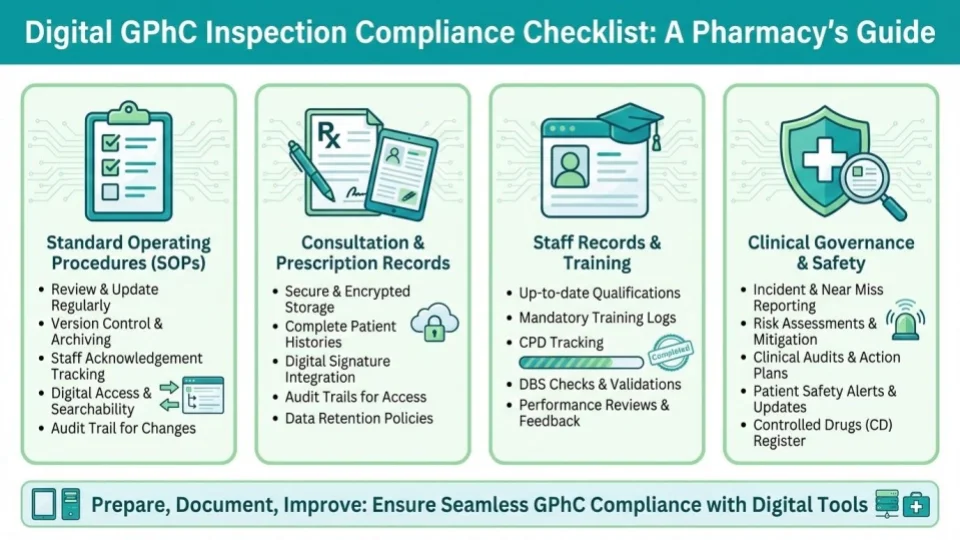
1. Standard Operating Procedures (SOPs)
- SOPs exist for every private service you offer (weight management, travel health, sexual health, etc.)
- SOPs are dated, version-controlled, and signed by the superintendent pharmacist
- All staff have read and signed acknowledgement of relevant SOPs
- SOPs are reviewed at least annually and updated when processes change
- SOPs are accessible to all staff (not buried in a folder nobody opens)
2. Consultation Records
- Every private consultation has a complete, dated record
- Records include: patient details, clinical assessment, safety checks performed, prescribing rationale, medication details, and prescriber identity
- Consultation notes are structured (not just “consulted and prescribed”)
- SmPC-guided consultation templates are used to ensure consistency
- Records are searchable and retrievable within seconds (not paper files in folders)
3. Prescription Records
- Every private prescription has a complete audit trail from consultation to dispensing
- Prescriptions include all legally required fields (patient details, medication, directions, prescriber details, date)
- Electronic prescriptions are stored securely with tamper-proof timestamps
- Repeat prescriptions are traceable to the original consultation
- A log of all private prescriptions issued is available for any date range
4. Staff Records
- All prescribers have current GPhC registration with appropriate prescribing annotations
- DBS checks are current for all staff with patient access
- Professional indemnity insurance is in place and documented
- Training records are up to date — including service-specific training
- CPD records demonstrate ongoing competence development
- Competence assessments have been conducted for each service offered
5. Clinical Governance
- Pre-screening questionnaires are completed before every consultation
- Contraindication checks are documented for every prescription
- Patient consent is recorded (not assumed)
- GP notification letters are sent for private prescriptions issued
- A clinical governance lead is identified and their role is documented
- Regular clinical audits are conducted (at least quarterly) with documented findings
6. Patient Safety
- An incident reporting system is in place and actively used
- Near-misses are recorded and reviewed alongside actual incidents
- Patient complaints procedure is documented and accessible
- Significant events are reviewed with documented learning outcomes
- Safeguarding procedures are in place with a named safeguarding lead
7. Premises & Equipment
- A private consultation room is available and suitable for confidential discussions
- Clinical equipment is calibrated and maintenance-logged (BP monitors, scales, thermometers)
- The consultation room has appropriate hand hygiene facilities
- IT systems are password-protected with role-based access controls
8. Data Protection
- ICO registration is current
- Privacy notices are displayed and given to patients
- Patient data is stored securely with encryption
- Access controls limit who can view patient records
- Data retention policies are documented and followed
- Procedures exist for data subject access requests
How Digital Tools Make Inspections Easier
The biggest challenge during inspections is not compliance itself — it’s proving compliance. Inspectors need evidence. With paper-based systems, pulling together consultation records, training logs, and audit trails can take hours. With digital systems, it takes seconds.
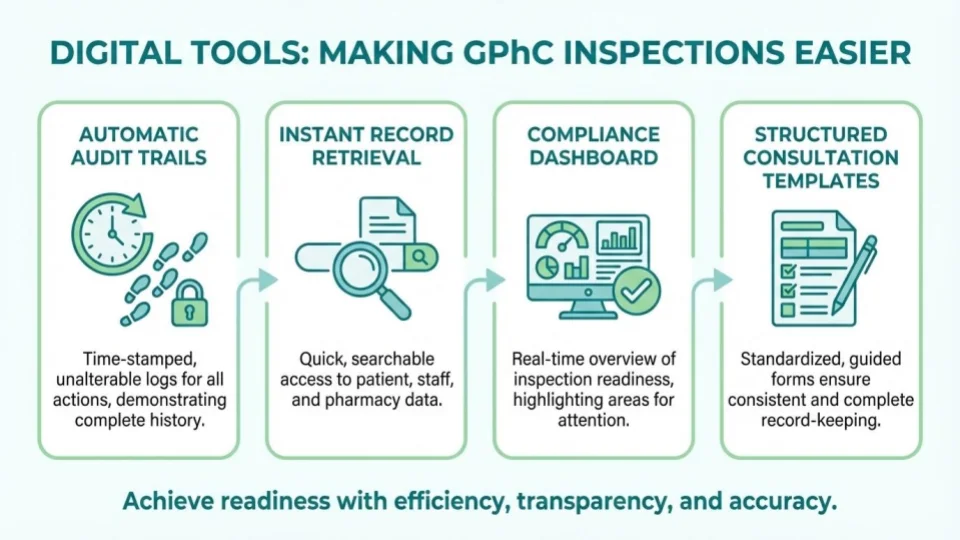
Automatic Audit Trails
Every consultation, prescription, and patient interaction is automatically logged with timestamps and user identities. No manual filing, no missing records, no gaps.
Instant Record Retrieval
When an inspector asks to see consultation records for a specific patient, date range, or service — you search and retrieve in seconds rather than searching through folders.
Compliance Dashboards
A compliance dashboard shows your status at a glance: staff certifications, upcoming expiries, audit completion, incident reports, and any flagged items. The superintendent pharmacist has immediate oversight across all services and sites.
Structured Consultation Templates
SmPC-guided templates mean every consultation follows a standardised, evidence-based structure. Inspectors see this as strong evidence of clinical governance — it demonstrates that safety checks cannot be skipped.
Common Inspection Findings to Avoid
Based on published GPhC inspection reports, these are the most frequent issues found in pharmacies offering private services:
- “Consultation records lack sufficient clinical detail” — Fix: Use structured templates that require clinical assessment documentation
- “No evidence of contraindication checks” — Fix: Embed safety checks into consultation workflows so they are automatically recorded
- “Staff training records are incomplete or out of date” — Fix: Use digital CPD tracking with expiry alerts
- “No regular audit of private prescribing activity” — Fix: Schedule quarterly audits and document findings digitally
- “GP notification not consistently sent” — Fix: Automate GP notification as part of the prescribing workflow
- “Incident reporting system not actively used” — Fix: Make incident reporting accessible and quick (one-click from dashboard)
Preparing for an Unannounced Inspection
The best preparation for an unannounced inspection is to be compliant every day — not just when you expect a visit. Digital compliance tools make this achievable by:
- Automating record-keeping so nothing is missed
- Sending alerts for upcoming expiries (DBS, insurance, training)
- Providing real-time compliance status visibility
- Making audit reports generateable on demand
With RxSure’s compliance features, your pharmacy is inspection-ready every day — not just on inspection day.
Key Takeaways
- GPhC inspections assess compliance with all 5 Standards for Registered Pharmacies
- Private prescribing records, clinical governance, and audit trails receive extra scrutiny
- Digital systems make proving compliance instant rather than labour-intensive
- SmPC-guided consultation templates demonstrate strong clinical governance
- The most common findings relate to incomplete records, missing safety checks, and outdated training
- Being inspection-ready every day is better than last-minute preparation